How Dynamics 365 keeps your business (and your soul) out of trouble
Let’s say you’re running a successful trading company in Waterdeep. You’ve got customers from Neverwinter to Calimport, moving everything from grain to griffon tack. Then one day, an order comes in:
Ten pounds of powdered mummy dust, two cursed grimoires, and a case of soulstones. Shipping destination? Thay. Buyer? The Red Wizards.
You pause. Not because you don’t have the inventory—oh, you do—but because you know these items come with strings, contracts, and possibly spectral audits. And this is where Dynamics 365 Finance and Operations becomes your most powerful (and lawful) ally.
So What Is a Restricted Product in the Realms?
In the real world, restricted items might include pharmaceuticals or firearms. In Faerûn? It’s enchanted reagents, cursed objects, or anything that screams “necromancer starter kit.”
Let’s look at a few examples from the Waterdeep Trading Company catalog:
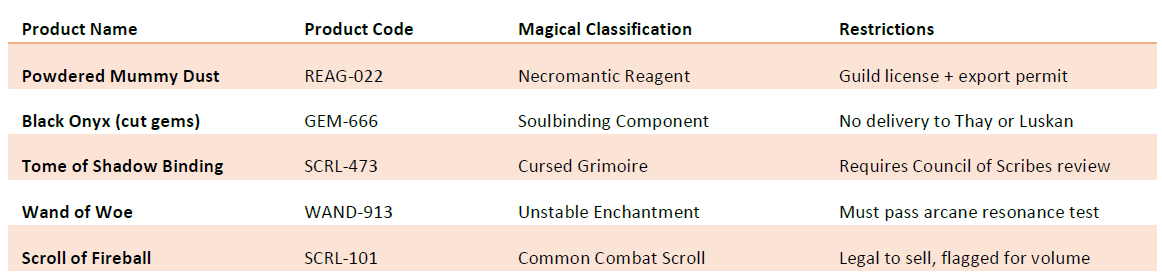
These are all configured as stocked products in D365, but flagged with restriction attributes like “Requires Permit,” “Region Lock,” or “Magical Risk Level: High.”
Selling Carefully, Not Fearfully
When a restricted item gets added to a sales order, Dynamics 365 can trigger rules to help keep your business from going down in flames (figuratively or literally). You might configure it so that:
- The system automatically places the order on hold until reviewed
- A compliance officer (or High Enchanter of Procurement) is notified
- Documentation, like guild approvals or trade licenses, must be attached before posting
The cool part? You don’t have to do this manually every time. The workflow engine handles it. For instance, an order for five Scrolls of Fireball to a mage college? Approved instantly. But that shady buyer from Luskan who just ordered three crates of “Moonlight Bleeding Daggers”? Yeah, that one gets routed straight to legal.
Managing by Region (Because Thay Happens)
You can also enforce restrictions based on where the item is going. Here’s how that might look:
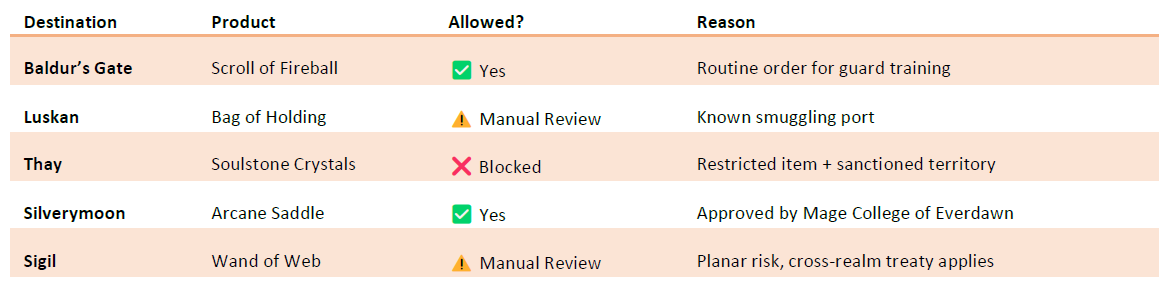
This lets your sales team focus on closing deals, while the system takes care of enforcing magical compliance, legal obligations, and common sense.
Auditable, Traceable, and Totally Not Illegal
Restricted product sales require documentation. You’ll need export permits, proof of guild membership, and in some cases, divine clearance from a temple. D365 lets you attach all of that right to the customer or order record.
So if the Lord’s Alliance knocks on your warehouse door asking why you sold thirteen shadow-bound daggers to a “Mr. X” from Skullport, you’ll have an audit trail longer than a paladin’s oath.
Why Bother?
Because when you’re moving dangerous goods in Faerûn, one wrong order can summon more than just a lawsuit. With Dynamics 365, you’re not just managing your inventory—you’re managing reputation, regulation, and risk.
You can sell exotic goods safely, smartly, and within the laws of magic and men.
Final Thought: The Scroll Doesn’t Sell Itself
Restricted products don’t mean restricted profits. They mean responsible handling, proper approvals, and a system that knows the rules—even if your customer doesn’t.
So go ahead. List that grimoire. Just be ready to click “Hold Order” if the buyer signs their name in blood.
Ready to Master Magical Compliance?
If you’re building a demo, teaching a course, or just trying to keep your trading company from being incinerated by bad procurement policy, the Advanced Dungeons and Dynamics 365 guides are for you.
Get step-by-step configurations, fantasy-themed templates, and prebuilt demo environments that bring Faerûn to life in Dynamics 365.
🎒 Grab your copy now at 👉 adnd365.com/start Because even restricted items need unrestricted control.



 A Tinkerers Notebook