Familiar Ground: Mapping CRM to ERP
Introduction
Every ERP concept in this lab has a CRM twin. The names changed, the forms got wider, and there are more required fields, but the underlying business logic is the same. This lab maps what we already know to where it lives in Finance and Operations.
We are not building anything new yet. We are reading, navigating, and comparing. By the end, the D365 F&O navigation should feel like a dialect of a language we already speak.
Overview
This lab maps six core CRM entities to their ERP equivalents. We will navigate to each F&O form, compare the record structure to what we know from CRM, and identify which fields are new, which are renamed, and which behave differently.
We will complete six activities:
- Open a customer record and compare it to a CRM account.
- Review customer groups and compare them to CRM account types or segments.
- Open a released product and compare it to a CRM product catalog entry.
- Navigate the site and warehouse hierarchy and understand physical inventory tracking.
- Open a vendor record and understand the purchase side of the same entity model.
- Review currency codes and understand multi-currency in ERP.
Each activity is a guided navigation exercise. No records are created or modified.
Objective
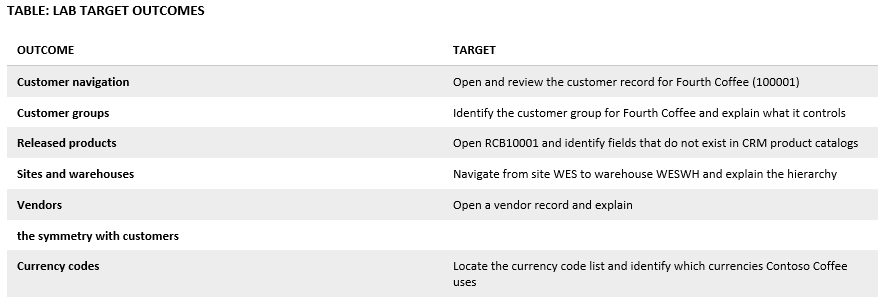
By completing this lab, we will be able to navigate six core F&O entity forms and explain the CRM-to-ERP mapping for each.
The following table defines the target outcomes for each entity mapping exercise.
TABLE: LAB TARGET OUTCOMES
Reference Data
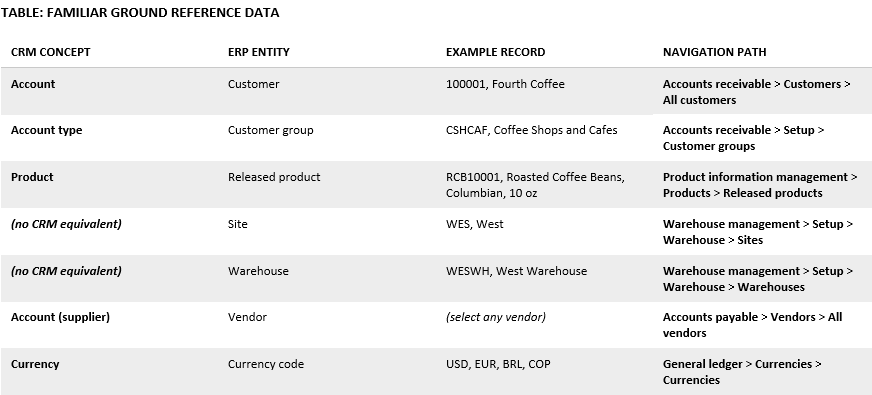
The following reference values support navigation during this lab. All records already exist in the Contoso Coffee database.
TABLE: FAMILIAR GROUND REFERENCE DATA
 A Tinkerers Notebook