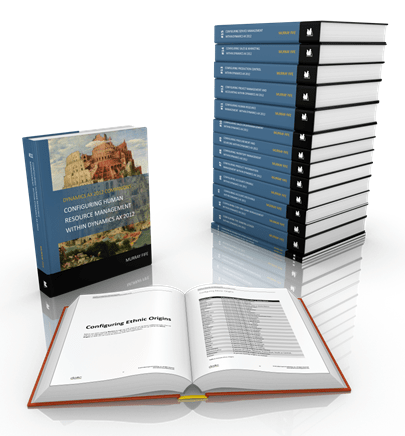
Over the past year and a half I have been working on one of my largest personal projects that I have ever worked on, which has been to create a series of guides for Dynamics AX that show you how to set up a company from the ground up and configure all of the common modules that most people would need, and a few that you might want to use.   The goal was to demystify the setup process and prove that Dynamics AX is only as hard to configure as you make it, and if you are a mid-range customer that even you can get a company configured and working without turning on every bell and whistle and without breaking the bank. If I can do it then you all surely can as well.   This week marks a major milestone in the project which is that I finally finished the last book in series, #11 – Configuring Human Resource Management within Dynamics AX which filled the gap in the 15 volumes which are:

  1. Configuring a Base Dynamics AX 2012 System
  2. Configuring an Organization Within Dynamics AX 2012
  3. Configuring The General Ledger Within Dynamics AX 2012
  4. Configuring Cash And Bank Management Within Dynamics AX 2012
  5. Configuring Accounts Receivable Within Dynamics AX 2012
  6. Configuring Accounts Payable Within Dynamics AX 2012
  7. Configuring Product Information Management Within Dynamics AX 2012
  8. Configuring Inventory Management Within Dynamics AX 2012
  9. Configuring Procurement & Sourcing Within Dynamics AX 2012
  10. Configuring Sales Order Management Within Dynamics AX 2012
  11. Configuring Human Resources Within Dynamics AX 2012
  12. Configuring Project Management & Accounting Within Dynamics AX 2012
  13. Configuring Production Control Within Dynamics AX 2012
  14. Configuring Sales & Marketing Within Dynamics AX 2012
  15. Configuring Service Management Within Dynamics AX 2012

Each of these guides have been designed to stand by themselves as reference material for each of the modules within Dynamics AX, but if taken as a whole series they are also a great training system that will allow even a novice on Dynamics AX work through the step by step instructions and build up a new company from scratch and learn a lot of the ins and outs of the system right away. I was able to prove this myself by using these guides as the basis for an series of 8 hands on training classes that I hosted for the AXUG Academy this year.   So who needs these books and why?

  • If you are Evaluating Dynamics AX then these are a great reference that allows you to get a grounding on Dynamics AX without all of the sales hype.
  • If you are Implementing Dynamics AX then these are a great reference that allow you to get a foundation of knowledge about Dynamics AX so that you can talk on a more level playing field with your implementation partner.
  • If you are an Implementer of Dynamics AX then these are great training guides that you can use before you start the pilot.
  • If you have Implemented Dynamics AX then these are a great reference for brushing up on the new features in Dynamics AX.
  • If you are Interviewing for jobs based on Dynamics AX then these guides will educate you on Dynamics AX and give you a jumpstart on your resume.
  • If you are Competing against Dynamics AX then this is a great way to be demoralized and see how easy Dynamics AX is to implement.

To tell you the truth, everyone needs a copy of these books. Even your grandmother needs a copy.   If you are interested in finding out more about the series and also view all of the details including topics covered within the module then browse to the Bare Bones Configuration Guide landing page on the Dynamics AX Companions website. You will find all of the details, and also downloadable resources that help you with the setup of Dynamics AX. If you decipher the code in the signature at the bottom of this email then you can get 20% off the books. Here is the full link:

http://www.dynamicsaxcompanions.com/barebonesconfig

  What is next? It’s revision time, so now I start the process of reviewing the guides and adding more sample data, case studies, and exercised to make the guides even better. And then I can start working on the AX7 version editions when it is officially released.

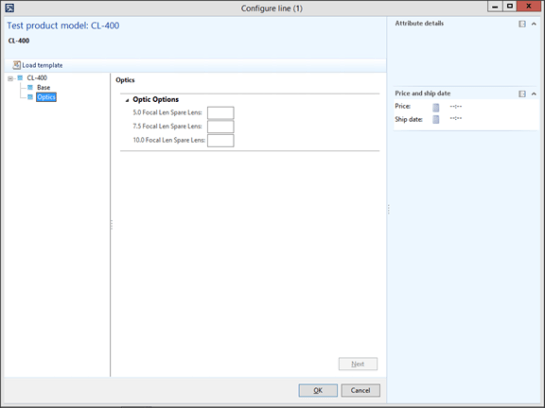
Today I have been working with the Product Configurator within Dynamics AX trying to find the tidiest way to set up the following configuration scenario and as I did this I discovered some pretty cool things that you can do through the calculations.

The scenario is that I want to set up a Configuration Model with multiple pages or User Configurations, but the selection for one attribute on one page will affect the selections on another page.

For example: If the user selects a Wattage of 4000 on this Base page…

Then on the Optics page below, the 5.0 Focal Length attribute needs to be disabled.


The problem with the Expression Editor though within the Product Configurator is that it is only able to see the attributes within the Parent level, and you cannot see any of the other User Components attributes.

Here Is How You Solve It:
Read More

I’m happy to say that I just finished the 10th book in the Bare Bones Configuration Guide series that I have been slaving over for the past year or so. This one lays the foundation for Sales Order Management within Dynamics AX, and it is now available for download or in print if you like. Here is a quick overview:

Configuring Sales Order Management Within Dynamics AX 2012

The Sales and Marketing area within Dynamics AX not only allows you to manage and track all of the customer contact information and marketing activities, but it also allows you to manage all of your sales order activities within your organization. It is where you can configure your sales hierarchies, which allow you to organize all of your products into more manageable groups, and it is also where you can initiate sales orders, manage the changes to the orders, and also manage all of your standard pricing and discount masters. All of these transactions then feed down into the Accounts Receivable module, making the whole sales cycle seamless.

Setting up the Sales Order Management details are not hard either and this guide is designed to give you step by step instructions to show you how to set up the Sales area, and also show you how most of the base components of the module work so that you can get you up and running and taking sales orders.

The book covers all of these areas related to Sales Order Management:

  • Configuring Sales Order Management Controls
  • Configuring Sales Categories
  • Processing Sales Orders
  • Configuring Sales Pricing
  • Configuring Sales Order Discounts
  • Configuring Order Charges


Hopefully this guide has given you a good foundation of knowledge of how the Sales Order Management area of Dynamics AX works, and also some of the key features that are available for you that allow you to configure and manage your Sales Orders.

We are still just starting you off on your journey through the Sales Order Management module though. There is so much more that you can do including taking advantage of Return Orders, Customer Ordering Templates, Customer Credits, Customer Holds and the Customer Self Service Portal which we did not have space for in this book, but don’t worry, these will be covered in the second volume.

If you want to get a printed copy of the book, or if you want an easy way to download a PDF copy then you can now get it from Blind Squirrel Publishing. Just follow this link and it will take you directly to the book details: Configuring Sales Order Management Within Dynamics AX 2012

If you want more information on this book then you can check it out on the Dynamics AX Companions website by clicking on the book icon to the right or by following this link: http://www.dynamicsaxcompanions.com/Bare-Bones-Configuration-Guides/Configuring-Sales-Order-Management

I hope that the guides help you with your Dynamics AX journey, and empower you a little more by giving you a better understanding of how all of the pieces fit together.

PS. Only one more book to go and the entire series of 15 books will be complete – all that is left is the Human Resource Management guide.

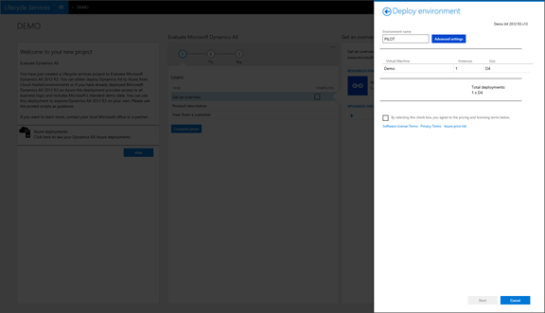
I was just tipped off today that anyone is able to sign up for LCS as long as they have a Windows Live account without having it linked to a customer or a partner account. I had to test it out myself and sure enough, if you go to lcs.dynamics.com then you can log in using your personal (unattached) Live ID.

Why should I care I hear you all say?

Because it means that anyone is able to deploy out a Dynamics AX Demo System in Azure to Test, to Pilot, and also to Train on. All that you have to do is pay for the Azure hosting fees

Now, I wonder where someone new to Dynamics AX would be able to get some basic training guides on AX… I wonder indeed…
http://www.dynamicsaxcompanions.com/barebonesconfig

About The Author:
Murray Fife is a Microsoft Dynamics AX MVP, Author of over 20 books on Microsoft Dynamics AX, and Solution Architect at I.B.I.S. Inc. with over 20 years of experience in the software industry. Like most people in his industry he has worked in many different roles during his career, including as a developer, an implementation consultant, and a trainer which gives him a great understanding of the requirements for both customers and partners. He is a regular contributor to the Dynamics AX community and in addition to hosting presentations for I.B.I.S. presents regularly for the AXUG and MS Dynamics World, has spoken at Microsoft Convergence and AXUG Summit conferences. If that was not enough, he works closely with Microsoft evaluating with their beta products and also is a Council Member on the Microsoft Dynamics Academic Alliance trying to help educate the new generation of consultants on Dynamics AX.

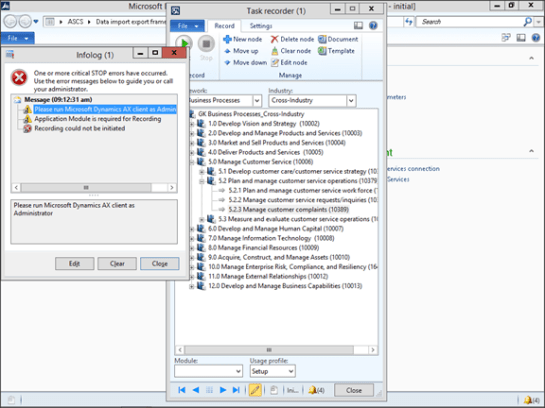
If you are using the new Task Recorder within Dynamics AX and are running it in Advanced mode then you may have noticed that you need to run the client as the administrator before you can record any task recordings. If you are like me, you never go to the trouble of starting AX in that mode, which means that when you try to record a task you get the following reminder and you then have to exit AX restart the client in Administrator mode.


Stop the insanity! Here is a quick trick that you can use to always start up AX as the administrator.
Read More

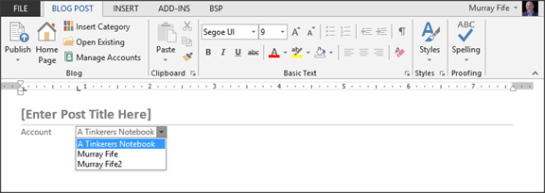
I use Word to post all of my blogs because it does all of the work for me. It formats the blog, it uploads all of the images, it slices, it dices and more.

One problem though is that if you host multiple blogs on the same blog site – like I do with WordPress, then when you register them with Word, it just uses your username as the description for the blog, and not the bog name. Every time I post a blog I am always making sure that I am posting it to the right blog site. There is nothing more embarrassing than that.

Don’t worry, tidying up the names is pretty easy. Read More

One project that I have been working on recently is how to set up a simple training environment for Dynamics AX that multiple students are able to connect to at the same time, without stepping on each other’s toes, or even knowing that the other students are there. The other day I was able to devise a possible solution and I thought that I would share it with everybody just in case you all were wanting to set up your own shoestring budget bare bones configuration training environments.

How To Do It…

Step 1: To start off I created a new training partition within Dynamics AX and then created a number of test companies that you could assign to each of the students. In this example I thought that the Forbes The 25 Largest Fictional Companies would be a good place to start.

Step 2: I created accounts for the students to log in with through Active Directory. I separated the users out by the Company that they are going to be assigned to just to make them easier to track. Paul Atreides is the Muad’Dib that should be in charge of the Spice on Arrakis.

Step 3: Now we want to set up the user within Dynamics AX but before we do that we want him to be able to manage his company, and only his company. The best way to do this is through the Security profiles, but there is no profile that has access to all of the functions that we need. So start off by creating a new security profile called Company Administrator and then add in the other security roles to create one master security role that we can assign to the user – you will see how we use this in a second.

Step 4: Now we can import in all of the student users into Dynamics AX. When you do this, give them the Company Administrator role to limit what they have access to.

Step 5: Now we just need to click on the Assign Organizations button within the User’s Roles and assign the one company that the user has access to.

How It Works

Now when the user logs into Dynamics AX then they will only be able to view their one company that they have the rights to.

Because of the security role that they have been assigned they will also not be able to access any of the security information that will allow them to undo their security settings.

As the teacher though you will be able to have access to all of the companies and will be able to review all of the data that is being set up and possibly tweak some of the companies if you like.

How cool is that!

About The Author

Murray Fife is a Microsoft Dynamics AX MVP, Author of over 20 books on Microsoft Dynamics AX, and Solution Architect at I.B.I.S. Inc. with over 20 years of experience in the software industry. Like most people in his industry he has worked in many different roles during his career, including as a developer, an implementation consultant, and a trainer which gives him a great understanding of the requirements for both customers and partners. He is a regular contributor to the Dynamics AX community and in addition to hosting presentations for I.B.I.S. presents regularly for the AXUG and MS Dynamics World, has spoken at Microsoft Convergence and AXUG Summit conferences. If that was not enough, he works closely with Microsoft evaluating with their beta products and also is a Council Member on the Microsoft Dynamics Academic Alliance trying to help educate the new generation of consultants on Dynamics AX.

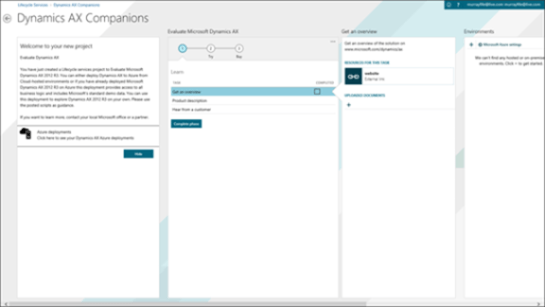
A couple of weeks ago I posted a note about the new Dynamics AX 2012 R3 image that you can deploy through the Azure Marketplace which is pretty darn cool: http://azure.microsoft.com/en-us/marketplace/partners/microsoft/microsoft_dynamics_lcs/?rnd=1

But the one thing that it was missing was a good training methodology to go with it.

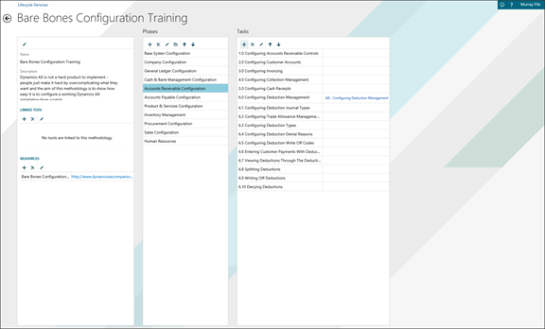
To solve this problem I decided to convert the Bare Bones Configuration Guides (http://www.dynamicsaxcompanions.com/barebonesconfig) into a custom methodology:

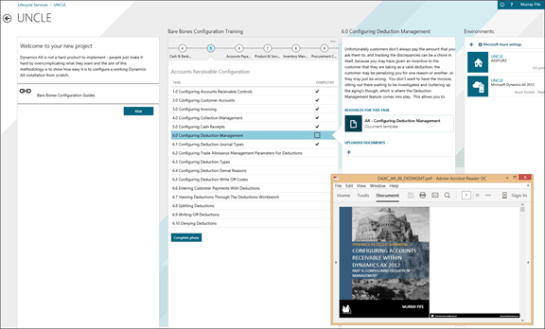
To make it even more useful I even attached the guides to the methodology steps for easy reference:

I wonder if this idea will catch on?

This week I have been reviving an old project that started a while ago and have started up a new project blog to track the progress. Being a lifelong fan of Dungeons & Dragons, with the unfortunate problem that I cannot find anyone to play with I have decided to create a test implementation Dynamics AX in the AD&D format just to see how it would work and if I can find some creative ways to use Dynamics AX and chose to implement the Waterdeep Trading Company as an example where I can track their many legal (and not so legal) entities within Faerûn. I call my creation:


Because you can’t spell Gygax without AX


I have a number of blog posts that have been queued up, but to start off the project I have posted my first article on “Coins, coins, coins… keeping track of Faerûn currencies in Dynamics AX” and here is a quick introduction:

The Faerûn currency is pretty straight forward and we at the Waterdeep Trading Company want to take it all, and not a copper piece less. So that means that we need to be able to convert all of the different coins back to our gold piece standard that we are using to track all of our financials.

For those of you that are not familiar with the Faerûn currencies, it’s pretty simple – there are five main currencies that people have in their money pouches – gp (gold pieces), ep (electrum pieces), sp (silver pieces), cp (copper pieces) and pp (platinum pieces) – and converting them is very straight forward as well.

1 gp = 2 ep = 10 sp = 50 cp = 1/5 pp

Or if you like looking at them within a table then here is another way to look at it:

cp

sp

ep

gp

pp

1 cp

=

1

1/10

1/25

1/50

1/250

1 sp

=

10

1

1/5

1/10

1/50

1 ep

25

5

1

2

1/10

1 gp

=

50

10

2

1

1/5

1 pp

=

250

50

10

5

1

Setting this up within Dynamics AX is a breeze.

For more details, just follow this link:
https://waterdeeptradingcompany.wordpress.com/2015/06/20/coins-coins-coins-keeping-track-of-faerun-currencies-in-dynamics-ax/


I hope this is useful, or at the very least entertaining and don’t hesitate to drop me a note if you have any comments or suggestions on other cool things to do with AX.