Archive

Author Archives: B-List Microsoft Celebrity, Available for Weddings and Bar Mitzvahs

The New Dynamics AX is a big change from the previous releases. The majority of the changes are around the new web based user interface, the new way that you navigate around in the application and also new sets of tools that have come along for the ride.

For those of you that are familiar with the older user interfaces then you may have to learn a couple of new tricks to get around the system like the pro that you are, and for new users of the New Dynamics AX environments then you will probably want as many tips on all the cool things that you are hidden away within the application so that you can quickly become a power user of the system.

I have scoured all of the resources that I have to compile the most useful tips and tricks for the New Dynamics AX and that will be useful to everyone, regardless of if you are a novice to Dynamics AX just trying to get around in the application, or have worked with the previous versions of the system, and are just want to learn the nuances of the new user interface.

Drilling into details through hyperlinks

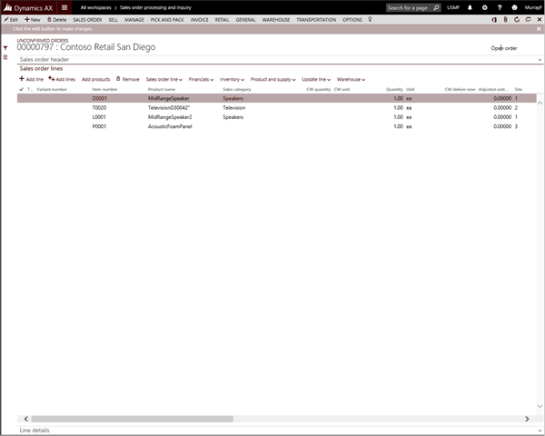
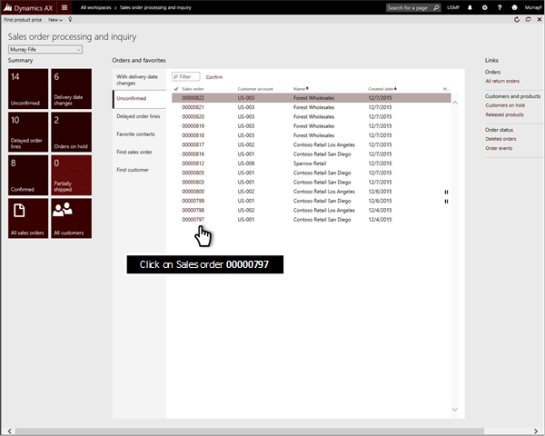
If you need to view any of the detailed information for the transaction or document that you are looking at then all you need to do is click on the hyperlink for the transaction.

How it works…

For example, if you want to see the order 00000797, then just click on it.

This will take you straight into the detail form showing you all of the sales order lines.

Want more?

If you liked this post and want to see more tips and tricks for the New Dynamics AX then I have compiled the 50 initial tips and tricks into a new guide for you all. If you want to get all of the tips and tricks in one place, then just follow the link: http://bit.ly/1mAzKf6

Also, if you are looking for more resources on Dynamics AX in general, then make sure you check out the Dynamics AX Companions site at www.dynamicsaxcompanions.com and also the Blind Squirrel Publishing site at www.blindsquirrelpublishing.com for more articles and books.

About the Author

Murray Fife is an Author of over 25 books on Microsoft Dynamics AX including the Bare Bones Configuration Guide series of over 15 books which step the user through the setup of initial Dynamics AX instance, then through the Financial modules and then through the configuration of the more specialized modules like production, service management, and project accounting. You can find all of his books on Amazon (www.amazon.com/author/murrayfife) and also even more on the BSP (www.blindsquirrelpublishing.com) site.

Murray is also the curator of the Dynamics AX Companions (www.dynamicsaxcompanions.com) site which he built from the ground up as a resource for all of the Dynamics AX community where you can find walkthroughs and blueprints that he created since first being introduced to the Dynamics AX product.

Throughout his 25+ years of experience in the software industry he has worked in many different roles during his career, including as a developer, an implementation consultant, a trainer and a demo guy within the partner channel which gives him a great understanding of the requirements for both customers and partner’s perspective.

For more information on Murray, here is his contact information:

Email:         mcf@blindsquirrelpublishing.com
Twitter:    @murrayfife
Facebook:    facebook.com/murraycfife
Google:        google.com/+murrayfife
LinkedIn:    linkedin.com/in/murrayfife
Blog:        atinkerersnotebook.com
Docs:        docs.com/mufife
Amazon:    amazon.com/author/murrayfife
The New Dynamics AX is a big change from the previous releases. The majority of the changes are around the new web based user interface, the new way that you navigate around in the application and also new sets of tools that have come along for the ride.

For those of you that are familiar with the older user interfaces then you may have to learn a couple of new tricks to get around the system like the pro that you are, and for new users of the New Dynamics AX environments then you will probably want as many tips on all the cool things that you are hidden away within the application so that you can quickly become a power user of the system.

I have scoured all of the resources that I have to compile the most useful tips and tricks for the New Dynamics AX and that will be useful to everyone, regardless of if you are a novice to Dynamics AX just trying to get around in the application, or have worked with the previous versions of the system, and are just want to learn the nuances of the new user interface.

Switching favorites lists

You will notice that there are a number of different favorites listed in this example, and as you switch between them you will be able to see different groups of data, and also some of the data has different data. Read More

Sandeep Chaudhury's avatarMicrosoft Dynamics 365 Blog

Hello All,

With the Public Preview of the “New Microsoft Dynamics AX” now out, I am sure all of us are excited to learn more about it and start exploring all possibilities with the new version.

Read  more about the new Dynamics AX on the Blog Post on SBS Group’s Blog spot.

Regards,

Sandeep

View original post

The New Dynamics AX is a big change from the previous releases. The majority of the changes are around the new web based user interface, the new way that you navigate around in the application and also new sets of tools that have come along for the ride.

For those of you that are familiar with the older user interfaces then you may have to learn a couple of new tricks to get around the system like the pro that you are, and for new users of the New Dynamics AX environments then you will probably want as many tips on all the cool things that you are hidden away within the application so that you can quickly become a power user of the system.

I have scoured all of the resources that I have to compile the most useful tips and tricks for the New Dynamics AX and that will be useful to everyone, regardless of if you are a novice to Dynamics AX just trying to get around in the application, or have worked with the previous versions of the system, and are just want to learn the nuances of the new user interface.

Workspace favorites lists

In the center of the form you will see an area where you can see more links to documents and transactions that should be important for your job. Read More

The New Dynamics AX is a big change from the previous releases. The majority of the changes are around the new web based user interface, the new way that you navigate around in the application and also new sets of tools that have come along for the ride.

For those of you that are familiar with the older user interfaces then you may have to learn a couple of new tricks to get around the system like the pro that you are, and for new users of the New Dynamics AX environments then you will probably want as many tips on all the cool things that you are hidden away within the application so that you can quickly become a power user of the system.

I have scoured all of the resources that I have to compile the most useful tips and tricks for the New Dynamics AX and that will be useful to everyone, regardless of if you are a novice to Dynamics AX just trying to get around in the application, or have worked with the previous versions of the system, and are just want to learn the nuances of the new user interface.

Workspace tiles

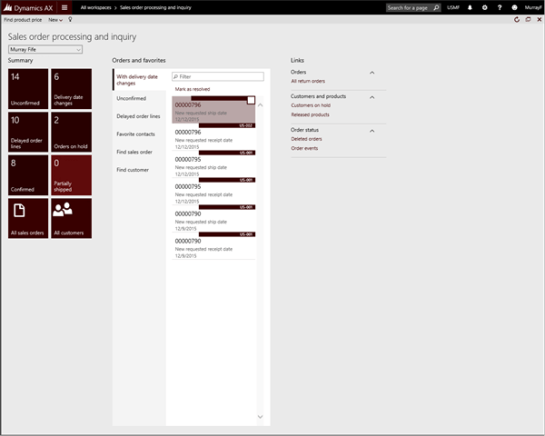
On the left hand side of the page you will see the workspace tiles. These are quick visuals that show you how many particular transactions are sitting within the status, and also quick links to other detail and list pages within the application. Read More

The New Dynamics AX is a big change from the previous releases. The majority of the changes are around the new web based user interface, the new way that you navigate around in the application and also new sets of tools that have come along for the ride.

For those of you that are familiar with the older user interfaces then you may have to learn a couple of new tricks to get around the system like the pro that you are, and for new users of the New Dynamics AX environments then you will probably want as many tips on all the cool things that you are hidden away within the application so that you can quickly become a power user of the system.

I have scoured all of the resources that I have to compile the most useful tips and tricks for the New Dynamics AX and that will be useful to everyone, regardless of if you are a novice to Dynamics AX just trying to get around in the application, or have worked with the previous versions of the system, and are just want to learn the nuances of the new user interface.

The New Dynamics AX Workspaces

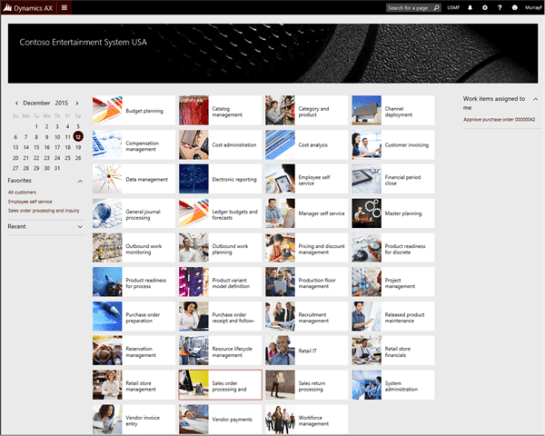
The first type of page that we will see is the main dashboard view. Here you will see that there are a number of Workspaces that are available that have been tailored to specific roles within the organization.

To go to any particular workspace, then all you have to do is click on the tile.

How they work…

For example, if you were an order entry clerk then you would probably just click on the Sales Order Processing and Inquiry workspace tile.

Now you are within the Sales order processing and inquiry workspace you will be presented with all of the core information that is necessary to track all of your sales orders and also link out to the other areas that you may need to help you along the way.

Want more?

If you liked this post and want to see more tips and tricks for the New Dynamics AX then I have compiled the 50 initial tips and tricks into a new guide for you all. If you want to get all of the tips and tricks in one place, then just follow the link: http://bit.ly/1mAzKf6

Also, if you are looking for more resources on Dynamics AX in general, then make sure you check out the Dynamics AX Companions site at www.dynamicsaxcompanions.com and also the Blind Squirrel Publishing site at www.blindsquirrelpublishing.com for more articles and books.

About the Author

Murray Fife is an Author of over 25 books on Microsoft Dynamics AX including the Bare Bones Configuration Guide series of over 15 books which step the user through the setup of initial Dynamics AX instance, then through the Financial modules and then through the configuration of the more specialized modules like production, service management, and project accounting. You can find all of his books on Amazon (www.amazon.com/author/murrayfife) and also even more on the BSP (www.blindsquirrelpublishing.com) site.

Murray is also the curator of the Dynamics AX Companions (www.dynamicsaxcompanions.com) site which he built from the ground up as a resource for all of the Dynamics AX community where you can find walkthroughs and blueprints that he created since first being introduced to the Dynamics AX product.

Throughout his 25+ years of experience in the software industry he has worked in many different roles during his career, including as a developer, an implementation consultant, a trainer and a demo guy within the partner channel which gives him a great understanding of the requirements for both customers and partner’s perspective.

For more information on Murray, here is his contact information:

Email: mcf@blindsquirrelpublishing.com
Twitter:  @murrayfife

Facebook:  facebook.com/murraycfife
Google:  google.com/+murrayfife
LinkedIn:  linkedin.com/in/murrayfife

Blog:  atinkerersnotebook.com

Docs:  docs.com/mufife
Amazon:  amazon.com/author/murrayfife
Last month I held an online seminar on A Beginners Guide To Writing And Publishing Visual Walkthrough Guides where I walked through the process that I use to publish my books, and also how to repurpose the content into other formats for blogs and presentations. And from the feedback that I got I think I succeeded in kick starting some other experts writing projects.

That seminar didn’t give many people much in the way of advance notice (I think it was just 5 days) so I wanted to give everyone a little bit more notice for the next seminar that I am planning to hold on Monday, December 21st, at 12pm Eastern Time ‎(UTC-5).  If you have all of your Christmas shopping done and want to learn how to get your writing career chugging along then I would definitely like to see you all online.

For the on-line seminar where I will walk you through all of these steps in real time.  In addition to showing you how easy writing and publishing books are, I will also give the seminar attendees:

  • All of the PowerPoint templates that I use to streamline the process
  • All of the Publisher files that make the cover creation a breeze
  • And also the beta of my Author Tools add in for PowerPoint that will re-publish all of the PowerPoints into Word and reformat your content for publishing, blogging, scripts, and other formats
  • Also you will get a digital copy of the companion guide for class that I finished last week as well to follow during the class.

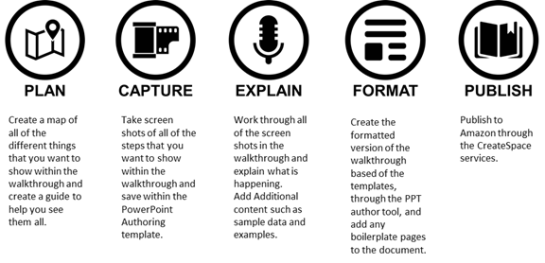
I will be walking through the five steps that I work through when I am writing my visual walkthrough guides and I am sure that when you see how easy this is to do you will want to start up your own little publishing business as well. I have distilled the process into these simple steps.


I used this process to create the companion guide for this event, and all up it took about 10 hours of work, which isn’t that much time if you ask me.

If you are interested in attending then you can sign up for the session here http://bit.ly/1lRsRp8 – this is a paid training event so I will then send you instructions on how to pay the $99.95 and then we will send you all the required login details and password to the event. We need the RSVP’s so that I can make sure that my GoToWebinar account is able to handle the number of attendees

I just thought that I would drop you all a note to say that I have set a date and a time for the first one and that is next Monday, November 30th, at 2pm Eastern Time ‎(UTC-5).  I realize that this is short notice, and this may not be the best time for everyone, and if this session is successful then I will try to hold another one next month, so if you can’t make it then I will understand.

For the on-line seminar where we will walk you through all of these steps in real time.  In addition to showing you how easy writing and publishing books are, we will also give the seminar attendees:

  • All of the PowerPoint templates that I use to streamline the process
  • All of the Publisher files that make the cover creation a breeze
  • And also the beta of my Author Tools add in for PowerPoint that will re-publish all of the PowerPoints into Word and reformat your content for publishing, blogging, scripts, and other formats
  • Also you will get a digital copy of the companion guide for class that I finished last week as well to follow during the class.

I will be walking through the five steps that I work through when I am writing my visual walkthrough guides and I am sure that when you see how easy this is to do you will want to start up your own little publishing business as well. I have distilled the process into these simple steps.


I used this process to create the companion guide for this event, and all up it took about 10 hours of work, which isn’t that much time if you ask me.

If you are interested in attending then you can sign up for the session here http://bit.ly/21k9Dcs – this is a paid training event so we will then send you instructions on how to pay the $99.95 and then we will send you all the required login details and password to the event. We need the RSVP’s so that I can make sure that my GoToWebinar account is able to handle the number of attendees

Drop me a note if you have any questions.

Last week I mentioned that I am planning to hold an on-line seminar to teach anyone who is interested how I plan out, write and publish books so that maybe some of you all might be able to follow the process that I work through and become published authors as well.

The response was great and I received more RSVP’s than my current GoToMeeting account can handle – don’t get me wrong, I’m not complaining – so now I am trying to find a couple of dates and times that will fit with everybody’s time zones and schedules so if you have dropped me a note saying that you are interested in attending then watch out for an e-mail with the proposed times and details.

Because of that I thought that it was probably a good idea to formalize the seminar and plan out what I was going to show and I have distilled the writing process into five key steps which are:


And as I was doing that I needed an example to work through so I wrote, and published a book on how to write and publish books, using the book as the worked example for the screen shots and examples. I thought this was ingenious if you ask me.

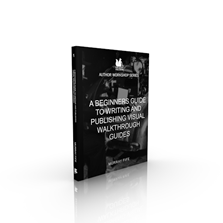
As a result, after about 10 hours of actual work I now have a new book that you all can download to get a sneak peek into the training class that I will be giving and also a guide on how you can do the same on your own. You can grab a copy at the BSP site.


If you want to check it out then here is a link: http://bit.ly/1l7ia1w

For the on-line seminar where I will walk you through all of these steps in real time. In addition to showing you how easy writing and publishing books are, I will also give the seminar attendees:

  • All of the PowerPoint templates that I use to streamline the process
  • All of the Publisher files that make the cover creation a breeze
  • And also the beta of my Author Tools add in for PowerPoint that will re-publish all of the PowerPoints into Word and reformat your content for publishing, blogging, scripts, and other formats

If you want to learn more, and also join the others that have signed up then drop me a note at mcf@blindsquirrelpublishing.com

I don’t know if you all have noticed, but over the past couple of years I have been able to publish a couple of books. They’re not the Da Vinci Code, but they do uncover a couple of secrets here and there.

The number one question that I get from people is “How do I write the books so quickly?”, and the second most common question is “When do you find the time to write the books?”

The answer is that I have fine-tuned the process of authoring walkthrough guides over the years and by creating templates and also automating a lot of the formatting work through macros and pre-built templates. The creation of the content happens automatically as I document processes for myself, and the publishing of the content becomes a simple byproduct. As a result I am able to share everything that I learn with you all in a easy to follow format. And to make this even better, I self-publish and it doesn’t really cost me a cent out of pocket.

In a nutshell there are just a simple set of steps that I go through with all of my books in order to get them out to you all and I have distilled them into these five categories:


I think that this is something that everyone should be able to do and want to teach everybody that this isn’t rocket science and that you shouldn’t be afraid of writing and sharing your knowledge with the rest of the community. Heck, if I can do it everybody should be able to. And along the way you all could make a little bit of pocket money as well.

Informally I have helped a couple of people start down this track, but I am thinking that I am going to hold a small on-line training seminar with any of you all that may be interested in learning how to do it. In the session I will walk through all of the steps that I go through to create, and publish books, and I will also share with the attendees all of the templates that I have generated that they will be able to use to start off their own publishing empire.

It will probably be about 2-4 hours long (I’m estimating), held on a Saturday, and to cover the setup and online costs it will be a fee per participant – probably US$99 per attendee, so keep that in mind if you want to sign up, but if you follow my guide then you will make this back and more in no time.

I don’t have a date yet, but want to hold this before the end of the year, and I wanted to get feedback as to who would be interested in taking part, and also the time zones that I will be working with so that I can find the right time that suits everyone.

So if you are interested then just drop me a note (mcf@blindsquirrelpublishing.com) – If I get more than a handful of people then I will start planning a date.